
Table of Contents
- Why Look Beyond Meta Ray-Ban in 2026
- Top Smart Glasses Alternatives That Fit Your Workflow
- Best Smart Glasses for Work: Features That Actually Matter
- How to Choose Smart Glasses Without Wasting Money
- Smart Glasses Battery Life Comparison: What to Expect
- Budget vs. Premium: Where Your Money Goes
- Frequently Asked Questions
Last Updated: September 13, 2026
Why Look Beyond Meta Ray-Ban in 2026
Meta's Ray-Ban partnership proved smart glasses belong in everyday life, but it locked buyers into one ecosystem, one look, and one price bracket. Smart glasses alternatives to Meta Ray-Ban now span audio-first frames, camera-equipped models, and budget picks that handle the basics without the premium markup.

Smart glasses are wearable computers built into eyewear frames that deliver audio, camera, or display functions through touch and voice controls. The category has split into distinct tiers, and that's good news for anyone who wants function over branding.
At CleanCharge, the biggest change we've seen isn't the technology, it's the pricing: HD recording, voice calls, and translation now cost a fraction of the flagship name.
Top Smart Glasses Alternatives That Fit Your Workflow
The best alternative depends on whether you prioritize capture, calls, or comfort. Three categories cover most buyers: AI camera glasses, audio-first frames, and hybrid models.
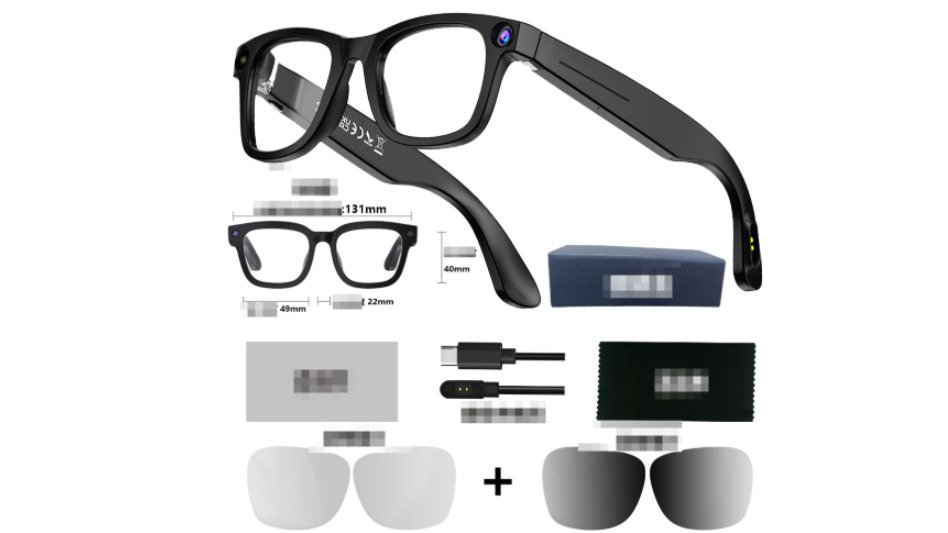
The AI camera segment is where the value gap is widest: you get recording and recognition features that used to require flagship pricing.
AI Camera Smart Glasses: The $89.99 Workhorse
The AI Camera Smart Glasses from CleanCharge pack HD video, anti-shake recording, voice calls, translation, and object recognition into one frame. Touch controls handle everything, the 390mAh battery covers a normal workday of intermittent use, and you choose between sunglasses and transparent lenses. The box includes a case, cable, and cleaning cloth.
At $89.99, this is our top pick for hybrid professionals who want camera and audio features without a flagship price. The trade-off: no designer brand cachet, but you get the function.
Audio-First Glasses for Calls and Focus
Audio-first frames skip the camera and focus on open-ear sound, microphone quality, and all-day comfort. They're lighter, draw less power, and disappear into a normal workday.
If your priority is calls and focus, this category beats camera models on battery life and weight. You lose capture capability but gain a device you'll forget you're wearing.
Best Smart Glasses for Work: Features That Actually Matter
For work use, prioritize microphone clarity, battery life, and fit over camera specs. A camera you rarely trigger is dead weight compared to a mic that makes every call sound professional.
Here's the shortlist of features that separate professional-grade frames from novelty ones:
- Beamforming microphones that isolate your voice from background noise
- Open-ear audio so you stay aware of your surroundings
- Adjustable nose pads for all-day comfort
- Fast charging to top up between meetings
- Device ecosystem compatibility with your phone and laptop
Latency matters too. A frame that lags on voice commands feels broken, even if the hardware is fine.
How to Choose Smart Glasses Without Wasting Money
Choosing smart glasses comes down to three questions: what you'll use daily, what ecosystem you're in, and what you'll pay for features you'll never touch.
Use this decision framework:
| Priority | Choose This Type | Skip This |
|---|---|---|
| Video capture | AI camera glasses | Audio-only frames |
| Calls and focus | Audio-first frames | Camera-heavy models |
| Budget under $100 | AI camera glasses | Premium flagship frames |
| All-day comfort | Lightweight audio frames | Heavy display models |
A common mistake is buying for the feature you'll use once instead of daily. Most buyers overestimate camera use and underestimate mic quality.
Smart Glasses Battery Life Comparison: What to Expect
Battery life is the spec most likely to disappoint smart glasses buyers, because the number on the box describes one narrow scenario. A frame rated for '8 hours' is usually rated for standby or intermittent audio, not continuous video capture (pubmed.ncbi.nlm.nih.gov). Understanding the use-pattern math before you buy separates a daily tool from a drawer resident.
The Three Use Patterns That Drive Runtime
Every smart glasses battery spec falls into one of three buckets. Compare frames within the same bucket, not across them.
- Standby and intermittent audio: Bluetooth connected, occasional voice assistant pings, a few short calls. This is where the full-workday claims come from. A 390mAh cell, like the one in the CleanCharge AI Camera Smart Glasses, handles this pattern across a normal day.
- Active audio and calls: Continuous open-ear playback or back-to-back voice calls. Expect roughly half the standby runtime. Beamforming mics and open-ear drivers pull steady current, and call quality features add processing overhead.
- Continuous video capture: The heaviest drain by far. Anti-shake processing, HD encoding, and storage writes all run simultaneously. No frame in this category escapes physics, continuous recording will always cut a full-day rating to a fraction of it.
Real-World Runtime by Category
| Frame Type | Standby / Intermittent | Active Calls | Continuous Video |
|---|---|---|---|
| Audio-first frames | Full workday | Roughly half a workday | Not applicable |
| AI camera glasses (390mAh class) | Full workday | Several hours | Short bursts only |
| Display-equipped frames | Shorter than audio-first | Shorter than audio-first | Shortest of the three |
Display-equipped frames sit at the bottom because the optical engine adds a constant load even when you are not actively reading a notification.
Charging Strategy for Hybrid Professionals
If you split your week between a home desk and an office, client site, or commute, battery management matters more than raw capacity. Three habits cover most hybrid schedules:
- Top up at the desk, not overnight. Fast charging between meetings adds usable runtime without a full recharge cycle. A short top-up during a lunch break is often enough to cover an afternoon of calls.
- Carry a compact power bank in your go-bag. A frame that dies mid-commute is dead weight. A pocket-sized USB-C bank that matches your phone's cable keeps both devices alive on the same charge.
- Match the frame to the day. Camera-heavy days need a top-up plan; audio-only days rarely do. Rotating between an audio-first frame and a camera frame based on your calendar is cheaper than buying one premium frame that tries to do both.
What Actually Shortens Battery Life Over Time
Two habits quietly cut runtime over the first year. First, leaving the frame in a hot car or sunny windowsill, small lithium cells degrade faster at high temperatures than phone batteries, because there's less thermal mass to absorb heat (pubmed.ncbi.nlm.nih.gov). Second, storing it at zero percent for weeks; a frame that sits empty for a month won't hold the same charge it did on day one.
Long-term users keep the frame between roughly 20 and 80 percent for daily use and only charge to full before a travel day, the cheapest way to protect the runtime you paid for (pubmed.ncbi.nlm.nih.gov).
The Bottom Line on Battery Specs
Ignore the headline hour count and ask three questions: How long on standby, during active calls, and during continuous recording? If a listing doesn't answer all three, assume the worst-case number is real. For most hybrid professionals, an audio-first frame plus a compact power bank delivers more usable hours per dollar than a premium camera frame with a bigger spec sheet.
Budget vs. Premium: Where Your Money Goes
Most smart glasses coverage stops at 'budget is a good value.' That's not a buying decision. The real question is which features justify a higher price for your workflow and which are pure markup. Here's what each tier actually buys you, plus a splurge-or-save rule per feature.
What Each Tier Actually Buys
| Tier | Typical Price Band | What You Get | What You Give Up |
|---|---|---|---|
| Budget | Under $100 | Core audio, camera, touch controls, translation, object recognition | Brand cachet, refined fit, premium mic tuning |
| Mid-range | $100-$200 | Better beamforming mics, longer battery, lighter frames, improved lens options | Designer branding, ecosystem lock-in perks |
| Premium | $200+ | Designer frames, deep ecosystem integration, polished software, brand prestige | Price-to-function ratio, repairability, freedom to switch ecosystems |
The CleanCharge AI Camera Smart Glasses sit in the budget tier at $89.99 and cover the core functions, HD video, anti-shake recording, voice calls, translation, and object recognition, with a 390mAh battery, touch controls, and a choice of sunglasses or transparent lenses. For most hybrid professionals, that covers the daily-use cases that drive the purchase.
Splurge or Save: A Feature-by-Feature Framework
Not every upgrade is worth the money. Here is how to decide, feature by feature.
- Microphone quality, splurge if you take calls all day. Beamforming mics that isolate your voice from background noise are the single upgrade most professionals notice immediately. If your calendar is back-to-back calls, this is the feature worth paying for.
- Camera resolution, save unless you publish footage. A camera you trigger twice a month does not justify a premium frame. Budget-tier HD capture is enough for quick documentation, notes, and casual clips.
- Frame materials and fit, splurge if you wear them eight hours a day. Adjustable nose pads, lightweight hinges, and lens options matter more the longer you wear the frame. This is where mid-range and premium tiers earn their price.
- Ecosystem integration, splurge only if you are locked in. Deep integration with a specific phone or laptop ecosystem is valuable if you never plan to switch. If you might change platforms, that integration becomes a liability.
- Display features, save unless you have a specific use case. Display-equipped frames cost more, weigh more, and drain faster. Buy them only if you have a concrete daily task that needs a heads-up display.
- Brand and design, save unless the frame is also your everyday eyewear. If the glasses double as your primary prescription or sunglasses, design and brand matter. If they are a work tool, function wins.
The ROI Math Most Buyers Skip
Think in cost per daily use. An $89.99 frame worn five days a week for a year costs a few cents per use; a $300 frame worn twice a month costs dollars per use, even though the sticker price is only a few times higher. The premium tier only pays off when the extra features change how often you actually wear the frame.
When the Premium Tier Is Actually Worth It
Paying more makes sense in three situations: the frame is also your primary eyewear and you need prescription lenses or a specific fit; your job depends on call clarity and you need the best microphone array; or you're deep in one ecosystem and the integration saves real time daily.
Outside those three cases, the budget tier delivers the productivity features that matter, and the difference is better spent on accessories, a compact power bank, spare charging cable, and commute-proof case, that make the frame work harder.
The Bottom Line on Price Tiers
The real difference between tiers is polish, not capability. Ask whether you're paying for a function you'll use daily or a logo you'll notice once. For most buyers, the answer points to the budget tier, with a targeted upgrade only on the one or two features that drive your workflow.
Frequently Asked Questions
Do smart glasses alternatives offer the same camera quality as Meta Ray-Bans?
Camera quality varies widely across alternatives. Many budget-friendly options like the AI Camera Smart Glasses from CleanCharge capture HD video with anti-shake recording, which handles everyday work tasks like quick documentation or video calls. Premium alternatives may offer higher resolution, but for most office and field use, HD video is sufficient. Check the resolution and stabilization features before buying.
What features should I look for in smart glasses for work?
Prioritize battery life, comfort for all-day wear, and connectivity. Look for at least 390mAh battery capacity if you need several hours of use, Bluetooth for calls and audio, and touch controls for hands-free operation. If you wear prescription lenses, check whether the frames accept custom lenses. Also consider weight and fit, since you will wear them for hours.
Are there affordable smart glasses for daily office use?
Yes. The AI Camera Smart Glasses from CleanCharge cost $89.99 and include HD video, voice call, translation, and object recognition. They come with sunglasses and transparent lens options, making them suitable for indoor and outdoor use. For budget-conscious buyers, this price point delivers core productivity features without the premium markup of flagship brands.
How long does smart glasses battery life typically last?
Battery life depends on usage. The AI Camera Smart Glasses have a 390mAh battery, which supports several hours of mixed use. If you stream video or make frequent calls, expect shorter runtime. For all-day work, look for glasses with at least 390mAh or consider carrying a portable charger. Always compare battery specs in milliamp-hours, not just marketing claims.
Smart glasses have matured past the novelty stage, and the alternatives now beat the flagship on value for most buyers. CleanCharge carries the AI Camera Smart Glasses at $89.99, with HD video, anti-shake recording, voice calls, translation, and object recognition in one frame. Browse the CleanCharge collection to find smart glasses and lifestyle gadgets that fit your workflow without the premium markup.