
Table of Contents
- Step 1: Set Up a Screen-Free Zone That Makes Play Easy
- Step 2: Use Low-Prep Indoor Activities for Kids to Fill the First Hour
- Step 3: Choose Educational Toys for Child Development That Hold Attention
- Step 4: Learn How to Encourage Independent Play Without Walking Away
- Step 5: Handle the Transition From Screen Time Without a Meltdown
- Step 6: Rotate Toys and Materials So Boredom Does Not Win
- Step 7: Know When to Join In and When to Step Back
- Common Mistakes That Sabotage Screen-Free Play
- Frequently Asked Questions
Last Updated: September 27, 2026
Step 1: Set Up a Screen-Free Zone That Makes Play Easy
Learning how to keep children engaged without screens starts with your space, not your schedule. A screen-free zone keeps play materials visible and reachable, so children can start playing without asking for help.
Instead, try this:
- Keep 3-5 open baskets on low shelves
- Put the most-used items at eye level
- Leave one "surprise" item out each week
- Clear floor space for building and movement
Step 2: Use Low-Prep Indoor Activities for Kids to Fill the First Hour
The first hour is the hardest. Low-prep indoor activities for kids work best when they need no setup and use what you already own. The American Academy of Pediatrics notes that unstructured play supports healthy brain development, so free play beats planned activities.
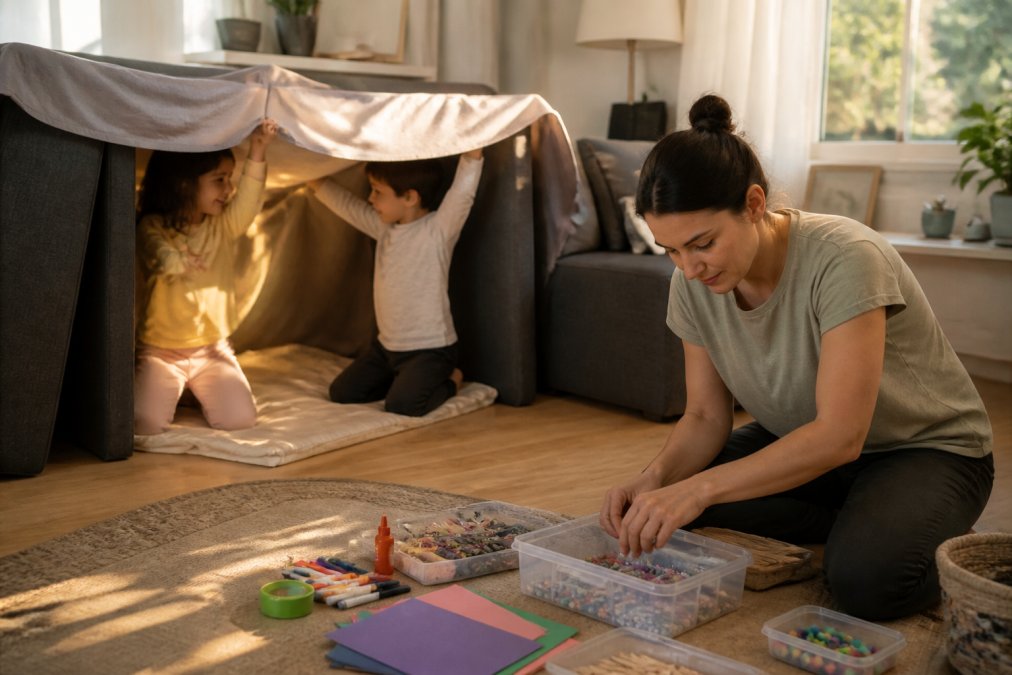
Start with these:
- A basket of socks for sorting and matching
- Cardboard boxes for building
- Measuring cups and a bowl of water
- Old magazines and safety scissors
- Tape on the floor as a "balance beam"
None of these need instructions.
Everyday Household Items That Become Toys
Common household items spark imaginative play and cost nothing.
- Cardboard tubes: telescopes, tunnels, marble runs
- Laundry baskets: boats, cages, storage for pretend shops
- Wooden spoons and pots: a kitchen band
- Pillowcases: sack races and puppet shows
- Tape and paper: roads, hopscotch, name tags
A common mistake is buying more before using what's already home. Try the free version first.
Building Forts, Dens, and Quiet Corners
Forts give children a private world they control, keeping them in one activity for longer stretches while building problem-solving skills as kids test what holds and what falls.
Keep a fort kit ready:
- Two flat sheets
- Four clamps or large clips
- Couch cushions
- A string of battery-powered lights
Step 3: Choose Educational Toys for Child Development That Hold Attention
Educational toys for child development only work if your child actually plays with them. The best picks are open-ended, meaning they can become many things. A single-purpose toy gets old fast.
Look for toys that:
- Have no fixed "right answer"
- Let kids build, sort, or pretend
- Match your child's current skills
- Grow with them for months
Match the Toy to the Developmental Stage
Age matters more than price. A toy that's too hard frustrates. One that's too easy bores.
| Age Range | What They're Working On | Toy Type That Fits |
|---|---|---|
| 2-3 years | Fine motor skills, sorting | Large blocks, stacking cups |
| 3-4 years | Pretend play, simple rules | Play food, basic puzzles |
| 5-6 years | Problem-solving, turn-taking | Strategy games, building sets |
| 7-9 years | Logic, planning ahead | Model kits, complex puzzles |
Step 4: Learn How to Encourage Independent Play Without Walking Away
To encourage independent play, set your child up for success, then stay nearby without stepping in. Independent play builds attention span and confidence.
Here's the sequence that works:
- Start the activity together for two minutes
- Say what you're doing and where you'll be
- Move a few feet away, still visible
- Check in with a smile, not a question
- Stretch the distance over time
Step 5: Handle the Transition From Screen Time Without a Meltdown
Screen transitions fail for a predictable reason: the child is asked to leave a high-stimulation activity for a low-stimulation one with no runway. The fix is a longer, more concrete handoff.
Why "Five More Minutes" Backfires
A vague time warning gives a child nothing to picture. "Five more minutes" is an abstraction. "After this episode, we build the fort" is a plan. The difference is whether the child's brain has something to move toward or only something to lose.
Two mechanisms drive the resistance:
- Transition cost. Switching tasks requires the brain to disengage and re-engage. Younger children have a shorter runway for this than older ones.
- Anticipatory loss. If the next activity is unknown, the child assumes it is worse. Naming it removes the guess.
Age-Specific Transition Scripts
The same routine does not work at every age. Adjust the language and the lead time.
Toddlers (2-3 years)
- Lead time: 2-3 minutes, with a visual cue (a timer they can watch, or "when this song ends")
- Script: "Two more minutes, then we put the tablet in its bed and you pick a book."
- What to avoid: asking "Are you ready to stop?", a toddler will almost always say no, and now you have negotiated.
School-age (5-9 years)
- Lead time: 5 minutes, plus a named next activity
- Script: "Five minutes. When it's done, you choose: the marble run or the fort. Which one?"
- What to avoid: offering the screen back as a reward later in the day. It re-elevates the screen above the alternative.
Pre-teens (10-12 years)
- Lead time: 10 minutes, with a reason rather than a command
- Script: "We're heading out at 4. Wrap up the level or pause it, your call, but it needs to be off by then."
- What to avoid: surprise shutdowns. Pre-teens read sudden stops as disrespect and escalate accordingly.
The Two-Choice Rule
Offering a choice between two screen-free options hands the child control and forces them to picture the next activity instead of the loss of the current one. Both choices must be acceptable: "Fort or marble run" works, "Fort or keep watching" does not.
A Sample Handoff, Start to Finish
- T-minus 10 minutes: Name the end point. "Two more episodes."
- T-minus 5 minutes: Name the next activity and offer the two choices.
- T-minus 1 minute: Confirm the choice. "So, fort. I'll grab the sheets."
- At zero: Start the new activity with them for the first two minutes. Do not walk away and expect momentum.
- First ten minutes: Stay low-pressure. Do not correct, redirect, or add rules. The goal is a soft landing, not a perfect activity.
When to Expect It to Get Easier
The first three to five transitions are usually the hardest, and the routine gets smoother once the child can predict the sequence. If transitions still escalate after two weeks of consistent lead times, the issue is usually the next activity, too passive, too hard, or too parent-dependent.
Step 6: Rotate Toys and Materials So Boredom Does Not Win
Toy rotation means storing most toys and keeping only a few available at a time. This keeps play fresh and cuts clutter. Boredom often comes from too many choices, not too few.
A simple rotation plan:
- Split toys into three groups
- Keep one group out for one to two weeks
- Store the other two out of sight
- Swap when interest drops
Step 7: Know When to Join In and When to Step Back
Most screen-free guides treat parent involvement as a single dial: either you are playing with your child or you are not. The useful distinction is between parent-led play (you run the activity) and parent-adjacent play (your child runs it and you are nearby). The second builds independent attention; the first gets you through a rainy afternoon. You need both.
Parent-Led vs. Parent-Adjacent: A Quick Sort
| Mode | Who drives | Typical duration | Best for |
|---|---|---|---|
| Parent-led | You | 10-20 minutes | Getting play started, teaching a new game, filling a hard hour |
| Parent-adjacent | Child | 20-60+ minutes | Building focus, stretching attention span, giving you a break |
| Fully independent | Child, out of sight | Varies by age | Older kids, established routines, quiet time |
The mistake is staying in parent-led mode past the point where the child could take over, that produces the "my kid won't play alone" pattern.
Age-by-Age Expectations for Independent Play
Attention span grows with age, but the ranges are wider than most parents expect. Treat these as rough anchors, not rules.
- 2-3 years: 5-10 minutes of solo play is realistic, often in short bursts with you visible.
- 3-4 years: 10-15 minutes, especially with open-ended materials like blocks or play food.
- 5-6 years: 15-25 minutes, and longer if the activity has a story or a goal.
- 7-9 years: 30-45 minutes, particularly with building sets, puzzles, or projects they chose themselves.
- 10-12 years: 45-90 minutes, including quiet time activities like reading, drawing, or audiobooks.
How to Step Back Without Abandoning
Stepping back is a physical move, not an emotional one. The child should be able to see or hear you. The sequence:
- Narrate the handoff. "I'm going to sit at the table and fold laundry. I'll be right here."
- Move a few feet, not a few rooms. Stay visible for the first several sessions.
- Check in with a smile, not a question. "Looks like the tower is getting tall" beats "What are you building?", the second pulls them out of the play to answer.
- Stretch the distance over days, not minutes. Once they are reliably focused, move to the next room with the door open.
- Return on their terms. If they call you over, go. If they are narrating to themselves, stay put.
Signals to Join, Signals to Hold Back
Join in when:
- Your child says "Watch me" or "Look"
- Frustration is rising and the activity is about to collapse
- The play turns aggressive or unsafe
- A game has stalled and no one knows the next move
Hold back when:
- Your child is narrating the play out loud (a sign of deep engagement)
- They are repeating a favorite task, even if it looks repetitive to you
- They are solving a problem alone, even slowly
- They are quiet and focused, quiet is not the same as bored
The Trade-Off Nobody Names
Parent-adjacent play is less fun for you than parent-led play. That is the point: the goal is not to be a better playmate every hour but to build a child who can sustain their own attention while you get something else done. Treat the first few sessions as training, not free time.
Common Mistakes That Sabotage Screen-Free Play
The biggest mistake is treating screen-free time as a test. Kids pick up on pressure and resist. Keep the tone light and let play look messy.
Watch for these:
- Too many toys out at once
- Activities that need constant adult help
- No clear play space
- Ending play the moment it gets quiet
- Offering screens as a reward for "good" play
Frequently Asked Questions
What can kids do instead of screens?
Start with open-ended play that uses what you already own: cardboard boxes, blankets, measuring cups, and building blocks. Rotate in puzzles, board games, and pretend play setups. For structured options, a strategy game like a chess tic-tac-toe set keeps kids thinking while they play. The goal is to offer one clear activity at a time rather than a room full of choices, which helps children settle into play faster.
How do I transition my child away from screen dependency?
Cut screen time in predictable blocks rather than all at once. Announce the end five minutes before it happens, then move straight into a hands-on activity you have already set up. Pair the change with a consistent routine: same time each day, same first activity. Expect resistance for the first week. Most children adjust faster when the replacement activity is ready before the screen goes off, not after.
What are some low-prep activities to keep kids busy?
Keep a short list you can pull from in under two minutes: fort building with blankets, a puzzle on the kitchen table, sensory play with dry rice or pasta, drawing prompts, and storytelling with stuffed animals. Building blocks work well because one bucket supports many ages and setups. Store materials in one accessible bin so kids can start without asking you to find anything.
How can I encourage independent play without screens?
Set up the activity, show your child one way to start, then sit nearby without directing. Answer questions briefly and resist fixing their work. Start with five to ten minutes of solo play and extend it gradually. Toys with open-ended parts, like building blocks or a DIY organ model, hold attention longer because there is no single correct outcome. Praise the effort, not the result.
Building a screen-free routine takes patience, and some days will test it. CleanCharge helps by stocking practical tools that make play easier to start, like building blocks, strategy games, and hands-on science kits, all at prices that don't strain the budget. New customers can get 20% off with code First20. Get started with CleanCharge and give your kids play that holds their attention without a screen.